Transmittals¶
Part of the user manual. Related: WORKFLOWS · EDMS · CONTACTS · COMPANIES · NOTIFICATIONS · TENANCY · VISIBILITY · PERMISSIONS · ACTIONS · PROJECTS · DASHBOARD.
A transmittal is a formal "here are these documents, at these versions, please acknowledge receipt" dispatch to a list of people. It's the audit-trailed way to issue documents out of REBIM — the record of what was sent, which versions, to whom, when, and who confirmed they got it.
Transmittals live in the workflow app (apps.workflow) and share the
Transmittals tab with the rest of a project's workflow surfaces, but a
transmittal is not a workflow event. It has no
statuses, no transitions, and no role mechanism — it's a one-shot
issue-and-acknowledge record, not a thing that moves through steps.
This page covers the transmittal model, how one is composed and sent,
acknowledgement + recall, document "bakes" (version snapshots), and
the Transmittals tab.
TL;DR¶
- A transmittal issues a set of documents at chosen versions to a list of individuals (and/or distribution groups), with a subject + message.
- Recipients are notified by email + livefeed. They can acknowledge receipt; the transmittal records who did and when.
- A transmittal can be recalled (with a reason) — recipients are re-notified. Recall is reversible.
- Sending a transmittal bakes each document — snapshots its metadata + active revision label at send time — so the historical record survives later edits to the live document.
- Transmittals are project-scoped data and tenancy-filtered like everything else (see TENANCY).
- The reference shown to recipients is
<project reference>-TN-<number>.
What a transmittal is¶
| Aspect | Workflow event (WORKFLOWS) | Transmittal |
|---|---|---|
| Model | WorkflowEvent |
WorkflowTransmittal |
| Lifecycle | Moves through statuses via transitions | Composed → sent → acknowledged → (optionally) recalled |
| Roles | Full role/discipline visibility (layers 4–5) | None — visibility is tenancy + project access only |
| About | A task / issue / pin on a document | A formal issue of one or more documents to recipients |
| Acknowledgement | n/a | Recipients confirm receipt (acknowledged_by) |
When someone says "the transmittal is stuck", there's no status to be stuck in — clarify whether they mean it didn't send (notification / recipient issue), wasn't acknowledged (recipient hasn't actioned it), or they can't see it (tenancy / project access).
Composing a transmittal¶
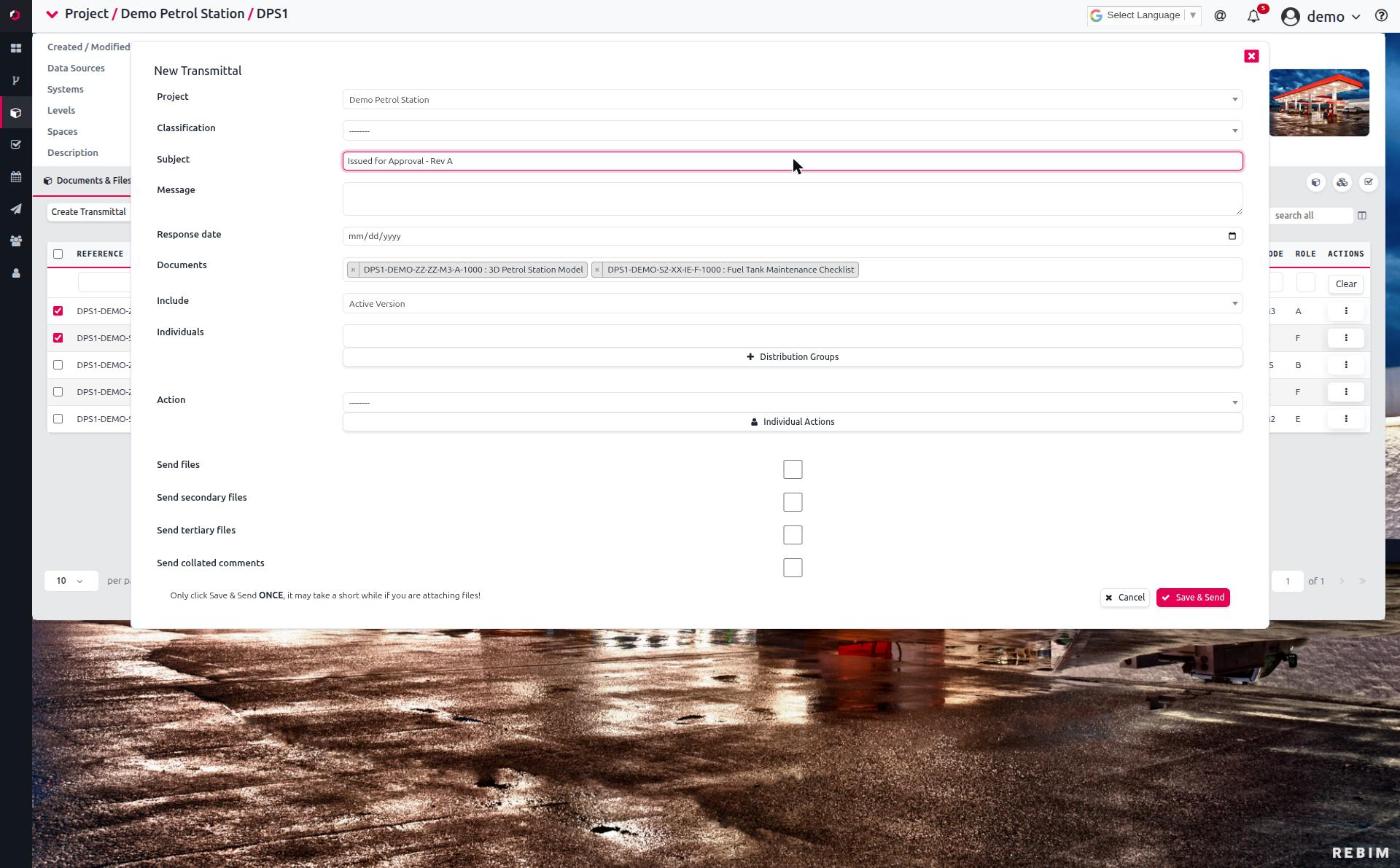
Created from the Transmittals tab (or by Duplicate-ing an existing one — see ACTIONS § Workflow Transmittals kebab). Key fields:
| Field | Purpose |
|---|---|
subject |
The transmittal's title — shown in the table, the email subject, and as its __str__. Required. |
message |
Long-form covering note sent to recipients. |
classification |
Optional EdmsDocumentClassification tag for the transmittal (e.g. "For Construction", "For Review"). |
action |
Optional WorkflowTransmittalAction — the default action requested of recipients ("For Information", "For Approval", etc.). Per-recipient overrides are possible (see below). |
documents |
The EdmsDocuments being issued. Adding documents triggers a bake. |
individuals |
Recipient contacts. |
groups |
Distribution groups — expanded into individuals at send time. |
response_date |
Optional date a response is requested by. |
Document version selection¶
A document has an active revision plus historical ones. include
controls which versions are issued:
include value |
Meaning |
|---|---|
| Active Version (default) | Only the current active revision. |
| Active + Previous | The active revision plus the most recent N prior ones, where N = previous_versions (default 1, minimum 1). |
| All Versions | The active revision and every historical revision. |
Sending the actual files vs. just the reference¶
| Field | Effect |
|---|---|
send_files |
When on, the document files themselves are attached/bundled into the transmittal rather than only referenced. |
send_secondary_files |
Also include each revision's secondary file (where present). |
send_tertiary_files |
Also include each revision's tertiary file (where present); reaches the recipient named <reference>_<rev>_TERTIARY.<ext>. |
send_collated_comments |
Also attach each document's latest collated comments file (the most recent revision that has one — see EDMS § Revisions). Independent of send_files; reaches the recipient named <reference>_<rev>_COMMENTS.<ext>. |
The create form can estimate the total attachment size before you send (it warns when the bundle is large enough that recipients' mail servers might reject it). Leave files off to issue a reference-only transmittal that points recipients back into REBIM.
Distribution lists¶
Recipients come from two places:
- Individuals —
DirectoryContacts added directly. A contact only receives email + a livefeed notification if it has a linked login / email (see the email-routing caveat in CONTACTS). - Groups —
WorkflowDistributionGroups. Groups are a front-end convenience: at send time each group is expanded into its member individuals, and it's those individuals that are recorded on the transmittal. The group itself isn't a persistent recipient — change a group later and previously-sent transmittals are unaffected.
Per-recipient actions¶
The default action applies to everyone, but each recipient can be
given a different requested action (stored in individual_actions_json).
Use this when, say, most recipients get "For Information" but two need
"For Approval" on the same issue.
Acknowledgement¶
Recipients confirm receipt, which adds them to acknowledged_by. Only
a contact who is actually on the transmittal's individuals list (and
logged in as the matching user) can acknowledge — acknowledging on
behalf of someone else isn't possible from the UI. The table surfaces
who has and hasn't acknowledged, giving the sender a live receipt list.
response_date records when a response was requested by; it doesn't
enforce anything, it's a documented target.
Recall¶
A sent transmittal can be recalled — e.g. the wrong version went out, or the issue was premature:
- Sets
recalled = Trueand stores arecall_reason. - Re-notifies every recipient with a clear "TRANSMITTAL HAS BEEN RECALLED" message including the reason.
- Is reversible via Cancel Recall, which returns the transmittal to its active state.
Who can recall (owner / superuser / project_admin) and the kebab mechanics are documented in ACTIONS § Workflow Transmittals kebab and PERMISSIONS § Workflow transmittals; this page doesn't restate them.
Bakes — version snapshots¶
When a document is added to a transmittal, REBIM bakes it: it
serialises the document's metadata and records the active revision's
label at that moment into a WorkflowTransmittalBake
(documents_baked). This is the transmittal's permanent record of
what was actually issued.
Why it matters: the live EdmsDocument keeps changing — new
revisions, edited metadata, even deletion. The bake is frozen, so a
transmittal from six months ago still shows the documents as they
were issued, not as they are now. The Transmittals tab's bake
history reads from these snapshots.
You don't manage bakes directly — they're created automatically as a side effect of attaching documents. They're an audit feature, not a user-editable one.
The Transmittals tab¶
Open a project → Transmittals. The tab shows the project's transmittals in a table.
- Chunked loading (BYOP): the table loads in chunks with a range selector for large projects, the same as the Documents and Workflows tabs. Pick "All N records" from the range dropdown to load everything.
- Report (CSV export): the Report button exports the currently-loaded rows to CSV. To export all transmittals, choose "All N records" from the range dropdown first, then Report.
- Bake history: access the issued-version snapshots for a transmittal from its row.
- Kebab actions (Duplicate / Recall / Cancel Recall) — see ACTIONS.
The same transmittals also surface in the cross-project dashboard.
Visibility¶
A transmittal is visible when the transmittal's tenants intersect the user's tenants and the user has access to its project. There's no role or discipline filtering — unlike workflow events, transmittals don't run the role mechanism. See the visibility row in TENANCY and the layered model in VISIBILITY.
Notifications¶
Sending, re-transmitting, and recalling all notify recipients (email + livefeed). The full recipient-resolution rules (individuals, expanded group members, owner record copy, the recall notification) live in NOTIFICATIONS § Transmittals — this page links there rather than duplicating them.
Troubleshooting¶
| Symptom | Likely cause | First check |
|---|---|---|
| A recipient didn't get the email | The contact has no linked login / email address | The contact's email + login (see CONTACTS email-routing caveat) |
| Added a group but a member didn't receive it | Groups expand to individuals at send time; that member wasn't in the group then, or has no email | The group's membership + the recipient's contact email |
| Transmittal not visible to a user who's on the project | Tenancy mismatch — transmittal's tenants don't intersect the user's | TENANCY — transmittal tenants ∩ user tenants |
| CSV export is missing rows | Report exports only currently-loaded chunks | Choose "All N records" from the range dropdown, then Report |
| Bake history shows an old document name | That's by design — bakes snapshot the document as issued, not as it is now | The live document for the current state; the bake for the issued state |
| Can't recall a transmittal | Not the owner / superuser / project_admin, or it's already recalled | ACTIONS § Workflow Transmittals kebab |
| Attachment too large / mail rejected | send_files on with a large version selection (All Versions + files) |
The include setting + send_files; consider a reference-only transmittal |
For developers¶
This page is for users and admins. Implementation pointers:
- Models:
apps.workflow.models—WorkflowTransmittal,WorkflowTransmittalAction,WorkflowTransmittalBake,WorkflowTransmittalInclude(the version-selection choices),WorkflowDistributionGroup. - Acknowledgement:
apps.workflow.views.ack_transmittal— adds the requesting user's contact toacknowledged_byonly if it's inindividuals. - Send / recall notifications:
apps.workflow.signals—updated_or_recalled+notify_transmittal_individualbuild the email (recall banner,<project>-TN-<tx_id>reference) and writeLivefeedNotificationrows. - Group expansion:
update_transmittal_groups(m2m_changed on thegroupsthrough table) expands groups into individual notifications. - Bakes:
bake_transmittal_documents(m2m_changed on thedocumentsthrough table) serialises each added document into aWorkflowTransmittalBake. - Tab loader:
app_workflow.jsrender_transmittals— BYOP chunked via/apps/workflow/transmittals/?project=PK.
See devdocs/ for codebase-level material.