Explorer¶
Part of the user manual. Related: EDMS · WORKFLOWS · TRANSMITTALS · NOTIFICATIONS · ACTIONS · PERMISSIONS · ROLES · PROJECTS · DASHBOARD.
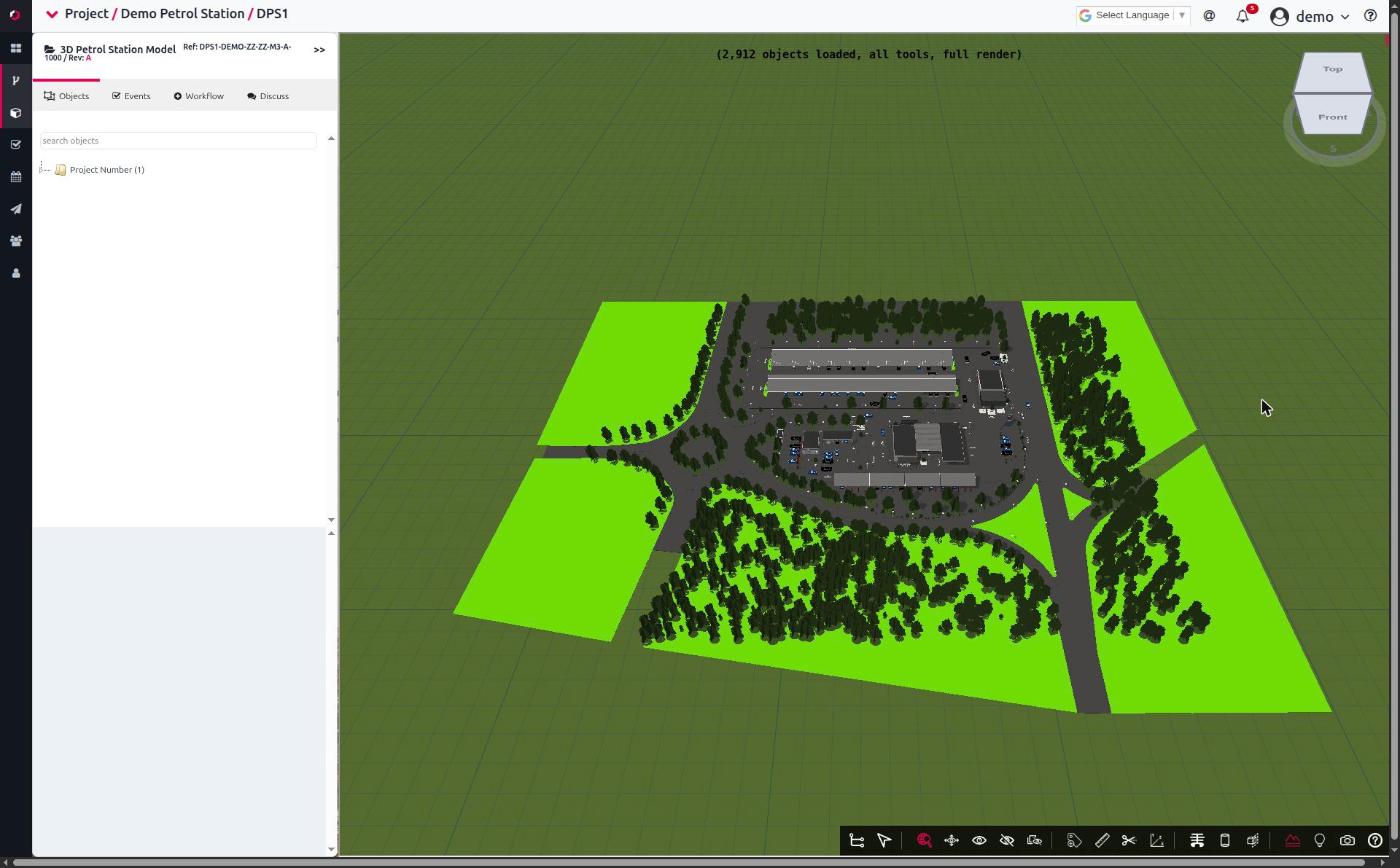
Explorer is a document tool — the same family as the Viewer, Markup, Painter, Stamper, and 3D Model Viewer. Like those, you launch it on a document; unlike a project tab, it has nothing to show until you do. The side panel can be toggled open/closed, but an open Explorer with no document selected is an empty shell. Think "inspector for this document", not "list of the project's stuff".
What it inspects, for the document you launched it on:
- Objects — for 3D models, a searchable tree of the model's elements (the IFC structure), wired to the 3D viewer.
- Events — the workflow items (Tasks, Issues, Planned, Pins, Transmittals) attached to the document, which you can filter, create, advance, and discuss.
It's also REBIM's main "instigator" surface — a lot of workflow activity (creating a task pinned to a model element, transitioning an event, commenting with @mentions, issuing from a model) starts here.
TL;DR¶
- Explorer is a document tool, launched on a document. Empty without one. Toggling the side panel only shows/hides it.
- Two tabs: Objects (3D model element tree) and Events (workflow items for the document).
- The Events tab shows top-level events only — Tasks, Issues, Planned, Pins, Transmittals. Comments / attachments live inside their parent event, not as their own rows (see Why some things don't appear).
- Selecting a model element filters the events to the ones anchored to it, and highlights it in the 3D viewer (and vice versa).
- From Explorer you can create events/pins, advance transitions, comment, open tools, and view transmittals — subject to the check-out lock and your role.
- It reads project-wide event/document data (so it stays correct regardless of which table chunk is loaded — see Data it reads).
Launching Explorer¶
Explorer is opened on a document, from several places:
- EDMS document kebab → Launch Explorer — the main entry point. A non-model document opens straight to the Events tab; an IFC / 3D model opens to the Objects tab (the model is converted + loaded first — see 3D models).
- From a tool — the Painter, Stamper, and 3D Viewer each have a Launch Explorer button, so you can jump from marking up a document to its events without leaving the tool.
- Project default model — opening a project that has a default 3D model auto-launches Explorer on it.
There is a Workflows / Explorer side-menu toggle that shows and hides the panel. That toggle is only visibility — it does not load a document. If you open the panel without having launched a document, it's empty; that's expected, not a bug.
Events tab¶
The Events tab is an accordion of the document's workflow items, grouped by type, then by status:
- Tasks, Issues, Planned, Pins, Transmittals.
- Each row shows the event name, the document revision label, a colour-coded status badge, and icons for an associated file / secondary attachment.
Click an event to open its detail: the workflow status, the EDMS status, buttons to view the document / associated file / discuss / edit, and — if you're allowed — a transition selector to advance it. See WORKFLOWS for what transitions do.
What you can do from an event¶
- Advance it — pick a transition from the dropdown. Fires the transition exactly as the Workflows tab would (dates auto-set, notifications send, a paired EDMS status change applies if the transition forces one). See WORKFLOWS § transitions.
- Comment — add a comment to the event's discussion, with
@mentions (type
@to pick a project member) and file attachments. Photos carry capture metadata (time / GPS / device) when the mobile app provided it. Comments notify per NOTIFICATIONS. - Edit the event — opens the same event form as elsewhere.
- Open the document / attachment — launches the appropriate tool (Viewer / Markup / Painter / 3D) for the file type.
Creating events from Explorer¶
Explorer is a primary place events get created, not just viewed:
- New event — the "Create Workflow" path (WORKFLOWS § creating an event) runs from Explorer too.
- Pin — when a model element is selected, a created event is
anchored to that element (
content_anchor= the element's id), so it shows up against that element from then on. Pins are the spatial-marker event type — a task tied to a specific spot in the model.
Why some things don't appear¶
The Events tab deliberately shows only top-level events. Comment and attachment items — and IoT events — don't get their own rows because they're children of a parent event: a comment belongs to the discussion of a Task/Issue, not alongside it. This is the same rule the main Workflows table uses (it lists parent-only events); Explorer follows it so the two surfaces agree.
So if you're "missing" a comment in the Events list — it's not missing, it's inside its parent event's discussion thread. Open the parent, open Discuss.
3D models (Objects tab)¶
When you launch Explorer on a 3D model (IFC), it shows the Objects tab: a searchable tree of the model's element hierarchy (project → site → building → elements).
- Select an element → the 3D viewer highlights it, and the Events tab filters to the events anchored to that element. Select something in the 3D viewer and Explorer reflects it back — the two stay in sync.
- Element properties — selecting a node shows that element's IFC attributes in the lower panel, and a way to see all documents / attachments associated with it.
- Federation — if the document federates with other models, Explorer loads the federated sub-models into the same tree, so a master model's Explorer spans the whole assembly.
Behind the scenes, opening a model triggers a conversion of the IFC into a viewable form and Explorer waits for that to finish before the tree appears — so the Objects tab may take a moment on first open of a large model. Non-model documents (PDF, image, Office) skip all of this and go straight to Events.
Transmittals in Explorer¶
Transmittals that reference the current document surface in Explorer too — selecting one opens the transmittal viewer. This is read-through; compose / recall / acknowledge happen on the Transmittals tab and its kebab actions.
Permissions and the check-out lock¶
Explorer respects the same gates as everywhere else:
- Check-out lock — if the document is checked out by another user, Explorer goes read-only: you can't create events, advance transitions, or edit. Viewing, discussing, and opening documents still work. Project admins and superusers override the lock. See EDMS § check-out and PERMISSIONS.
- Role visibility — the events Explorer shows are the events you're allowed to see (ROLES), filtered server-side. Explorer doesn't add or bypass role rules; it shows your slice.
- Tenancy + project access — Explorer only ever works within a project you can access; its data is tenancy-filtered like everything else (TENANCY).
Data it reads¶
Explorer reads project-wide feeds, on purpose:
- Workflow events from
/api/apps/workflow/explorer_events/?project=PK. - Slim project documents from
/api/apps/edms/project_documents/?project=PK.
These are deliberately not the chunked table feeds. The Documents and Workflows tables load in chunks (large projects page their rows), but Explorer needs to see all of a project's events/documents to resolve "what's anchored to this element" and "what's attached to this document" regardless of which chunk a table happens to be showing. So it uses the project-wide endpoints instead. (Practical consequence: Explorer's data is current as of when it loaded the project; a hard refresh re-pulls it.)
Troubleshooting¶
| Symptom | Likely cause | First check |
|---|---|---|
| Explorer panel is open but empty | No document launched into it — the side toggle only shows/hides the panel | Launch a document via its kebab → Launch Explorer |
| Objects tab is blank for a 3D model | The model is still converting, or the file isn't a supported 3D format | Wait for conversion; confirm the active revision is IFC/3D |
| A comment I added isn't in the Events list | Comments are children — they live inside the parent event's discussion, not as their own row | Open the parent event → Discuss |
| Can't create events / transition buttons missing | The document is checked out by someone else (Explorer is read-only for non-lockholders) | The document's check-out state (EDMS) |
| Selecting a model element shows no events | Nothing is anchored to that element, or those events are outside your role visibility | Whether any events were pinned to that element; your role |
| Federated sub-models missing from the tree | The master document's federate_with doesn't include them, or they're not a 3D format |
The document's federation list |
| Events look stale | Explorer loaded project data when the project opened | Hard-refresh to re-pull the project-wide feeds |
For developers¶
This page is for users and admins. Implementation pointers:
- Controller:
apps/dashboard/static/dashboard/js/app_explorer.js— single ES6 classdashboard_model_explorer(instantiated asapps_dashboard_callback.model_explorer). The largest single JS controller in the app. - Template / styling:
templates/default/core/explorer.html,core/static/core/css/explorer.css. - Entry points:
explore_edms_document(pk)(non-model),explore_local_model(pk)(IFC),explore_automatic_magic(data)(router). Called from the EDMS kebab (app_edms.js), the Painter / Stamper / 3D-viewerlaunch_explorer()buttons, and the project default-model auto-launch (app_dashboard.js). - Data feeds:
apps.workflow.views.project_explorer_events(WorkflowExplorerEventSerializer) andapps.edms.views.edms_project_documents— project-wide, not chunk-scoped (BYOP Phase 2a/2b). SeeBYOP-PLAN.md. - 3D binding: iframe postMessage (
select_by_name/select_by_pin),content_anchor= element id; conversion via/api/apps/edms/requests/poll then XML parse into jsTree. - Lock:
lock()/unlock()gate onchecked_out_by == user || is_super || is_project_admin.
Defunct:
explore_external_document/explore_external_model(thecontent_url"external model URL" path) are dead — thecontent_urlfield is commented out on the model and only legacy SharePoint / Viewpoint JS still references them. Not documented here because they don't function.
See devdocs/ for codebase-level material.